




Use Logistware to find flatbed loads that fit your equipment, preferred lanes and
operating schedule. Carriers can post truck availability, review open-deck freight,
place bids and manage awarded loads with tracking, live chat, driver assignments and
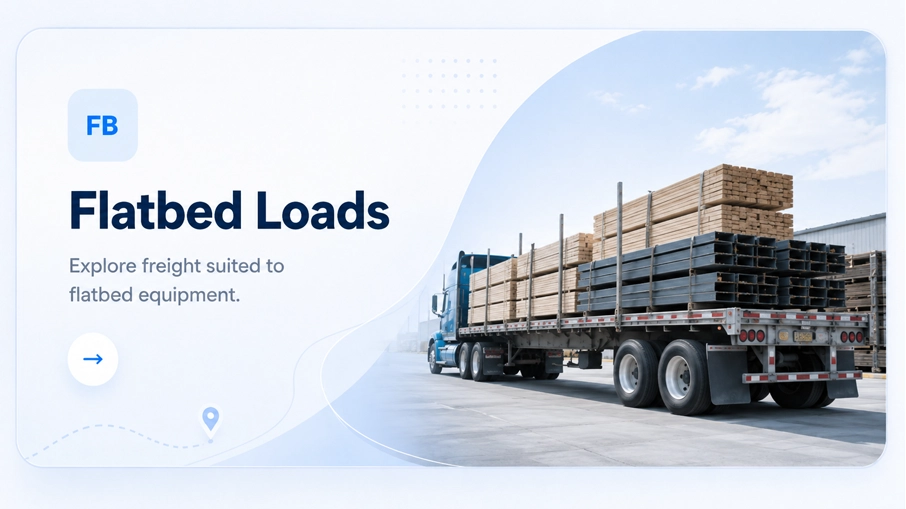
freight documents across Canada, the United States and Canada–U.S. cross-border lanes. Flatbed loads are freight shipments moved on open-deck trailers instead of enclosed dry vans
or refrigerated trailers. Flatbeds are commonly used when the freight is too large for an
enclosed trailer, needs side or top loading, or is better suited to open-deck handling. Common examples include lumber, steel, construction materials, machinery, industrial
components, fabricated products and other freight that can be safely transported on a
flatbed with the appropriate securement. Logistware provides the load-board connection between available freight and carriers.
The carrier remains responsible for confirming that the trailer, securement, dimensions,
weight and route requirements are appropriate for the actual load. Finding flatbed freight starts with knowing where your truck is available and what your
equipment can actually handle. Logistware lets carriers post truck availability and review
shipments that fit their route, timing and equipment requirements. Post where your truck is available so relevant freight can be surfaced around the area
and route. Your operating plan should still consider deadhead to pickup, appointment timing,
loaded distance and where the truck finishes after delivery. Review the origin, destination, commodity, dimensions, timing and equipment requirement
before committing. If the freight fits your trailer and route, place a bid and negotiate
the commercial terms through the load board. The load board can support the carrier from freight discovery through bidding, award,
driver assignment, shipment tracking and final delivery documents. Make the truck's availability and operating area visible for relevant freight. Compare the lane, timing, dimensions, weight and equipment requirements. Submit an offer when the shipment fits your equipment and business plan. Shippers and brokers can accept, reject or counter until the terms are agreed. Assign the driver and keep authorized users connected to shipment progress. Use the mobile app for PODs, photos and other load-related documents. The right flatbed load needs to fit more than a rate-per-mile calculation. The carrier
should evaluate empty distance to pickup, loading method, securement, appointment timing,
loaded route, delivery access and the next practical freight opportunity. Open-deck freight can also involve additional operating time for tarping, chains, straps,
blocking, crane loading, forklifts, job-site access or other shipment-specific requirements.
Those details can affect whether the load works for the truck and driver. Logistware gives the carrier a place to review the shipment and bid. The carrier still
makes the business and safety decision based on its own equipment, operating costs and schedule. “Flatbed” is an equipment category, not a guarantee that every open-deck load fits every trailer.
Freight dimensions, weight, loading method, securement, legal height and route requirements
should be confirmed before the carrier accepts the shipment. Shippers and brokers should provide dimensions, weight, commodity, loading method,
timing and relevant special instructions so carriers have enough information to evaluate the load. The carrier should verify that the trailer, securement equipment, driver capability and
operating plan are appropriate for the freight and applicable legal requirements. Logistware can use AI-assisted freight tools to reduce repetitive shipment entry and
support route- and lane-aware matching. Uploaded freight documents such as PDFs and EDI
Advanced Ship Notice files can help create shipment information with less manual typing
where the feature is available. What the load board should not claim is equally important. Logistware does not need to
promise that AI analyzes historical carrier profitability, provides proprietary real-time
rate heat maps, automatically finds the perfect flatbed load or guarantees a specific
profit target. The carrier still decides whether the freight makes sense after reviewing the route,
equipment, dimensions, timing, rate and shipment requirements. When a shipment fits the carrier's equipment and lane, the carrier can place a bid.
The shipper or freight broker can review the offer, reject it, accept it or make a counteroffer.
That process continues until the parties agree or decide not to move forward. Consider the complete movement and your own operating costs before bidding. Logistware
should not be described as guaranteeing a “fair rate,” the highest-paying flatbed load
or a specific level of profitability. Shippers and brokers decide which available offer best fits the shipment and commercial
requirements. The load is awarded only after the parties agree on the terms. Finding freight is only the first step. Logistware combines truck availability and carrier
bidding with shipment communication, tracking, documents and team tools that remain useful
after a flatbed load is awarded. AI-assisted shipment entry and route-aware matching can reduce repetitive work and surface relevant freight. Carriers can bid while shippers and brokers accept, reject or counter offers before award. Logistware is designed around clear subscription pricing with no hidden fees and no long-term contract. Shipment visibility, direct communication and freight-document exchange remain available after award. Carrier teams can manage dispatchers and drivers, assign awarded loads and use mobile tools during the shipment. Use the same Logistware account for Canadian, U.S. and Canada–U.S. cross-border freight lanes. Larger carriers and shippers can ask about a tailored portal when their freight,
team structure or account requirements call for a more customized Logistware setup.
Custom portals are available upon request. Logistware includes real-time shipment tracking so authorized users can follow an active
load as it moves from pickup toward delivery. That can help carrier dispatchers, shippers
and freight brokers coordinate appointments and respond to shipment updates. Tracking provides shipment visibility, but it does not guarantee that the load is properly
secured, that a route is legally clear for oversize freight or that external traffic,
weather and job-site conditions will remain unchanged. The carrier remains responsible for the safe transportation of the freight. Logistware's
role is shipment visibility and freight coordination. Flatbed freight can generate important loading, delivery and securement information.
Logistware's live chat and document exchange keep more of that load activity accessible
to the authorized people working on the shipment. Use chat for pickup questions, job-site access, delivery windows and other shipment
communication. It should not be described as guaranteeing permanent legal records or
eliminating every future dispute. Drivers can use the mobile app to upload bills of lading, proofs of delivery, photos and
other shipment files. If permits, weight certificates or specialized documents are produced
externally, they can be shared as load documents where appropriate. Carrier accounts can add dispatchers and drivers and assign awarded loads to the
appropriate driver. That helps keep freight activity organized as more than one person
becomes involved in the shipment. Many flatbed loads move within standard legal dimensions. Other shipments can be oversized,
overweight or better suited to step deck, double drop, lowboy or other specialized equipment.
The actual dimensions and route determine what the load requires. Lumber, steel, building materials and machinery can often move on standard flatbed
equipment when dimensions, weight and securement are appropriate. Taller, heavier or more complex freight may require step deck, double drop, heavy haul,
permits or route planning handled by qualified transportation professionals. Logistware supports freight moving within Canada, within the United States and across the
Canada–U.S. border. Flatbed freight can therefore be reviewed and managed alongside other
North American loads from the same account. The load board supports the freight connection and shipment activity before and after
a flatbed load is awarded. Customs clearance, brokerage, authority, oversize permits and shipment-specific regulatory
responsibilities remain with the appropriate parties and external systems. This page focuses on finding and moving flatbed loads. Related Logistware pages provide
deeper information about the flatbed load board and equipment categories that may be more
appropriate for taller or heavier freight. For the broader carrier, shipper and freight-broker experience, visit the Logistware Load Board. Flatbed loads are freight shipments moved on open-deck trailers. They commonly include
construction materials, steel, machinery, lumber and other freight suited to open-deck transport. Carriers can post flatbed truck availability and review shipments that fit their
equipment, preferred lanes and schedule. When a load makes sense, the carrier can place
a bid through Logistware. No. Freight availability, rates and carrier results depend on the loads users post,
market conditions, lane, equipment, timing and the carrier's own business decisions. Yes. Carriers can place bids on available shipments, while shippers and freight brokers
can accept, reject or counter offers until the parties agree on the load. This page does not claim universal broker payment histories, factorability scores or
guaranteed partner reliability. Users should evaluate the information actually available
in the current product and conduct shipment-specific due diligence. This page does not claim proprietary real-time rate heat maps or load-to-truck ratio
intelligence. Carriers should use the information actually available in the current
product and their own market and operating knowledge when bidding. No. Oversize permits, route surveys, bridge or clearance review and other specialized
transportation requirements remain with the qualified parties and external systems responsible for them. Yes. Drivers can upload load-related documents such as bills of lading, proofs of delivery,
photos and other freight files associated with an awarded shipment. Logistware supports Canadian, U.S. and Canada–U.S. cross-border freight lanes,
including shipments requiring flatbed equipment. Availability depends on the freight
posted by users at the time. Yes. Larger carriers and shippers can ask about a tailored Logistware portal when
their freight, team structure or account needs call for a more customized setup.
Custom portals are available upon request. Open Logistware to post your flatbed truck availability, review open-deck freight and
place bids on loads that fit your equipment and lanes. The Logistware homepage remains
the main destination for the broader North American load-board experience. Keep access to loads, messages, shipment tracking and freight documents close at hand
on iPhone, iPad or Android. Flatbed Loads: Find Open-Deck Freight Across North America
What Are Flatbed Loads?
How to Find Flatbed Loads with Logistware
Make Your Flatbed Truck Visible by Location and Route
Compare the Flatbed Load Before You Bid
How Flatbed Loads Move Through Logistware
Post Your Flatbed Truck
Review Open-Deck Freight
Place a Bid
Negotiate & Win the Load
Assign & Track
Upload Delivery Proof
A Good Flatbed Load Is More Than a High Rate
Confirm Trailer Fit and Securement Requirements Before Accepting Flatbed Freight
Describe the Freight Clearly
Confirm the Trailer and Securement Plan
AI-Assisted Matching Without “Perfect Flatbed Load” Promises
Bid on Flatbed Loads and Negotiate the Commercial Terms
Set an Offer That Works for Your Truck
Review the Available Carrier Offers
More Than a List of Flatbed Loads
AI Freight Intelligence
Carrier Bids & Counteroffers
Straightforward Pricing
Tracking, Chat & Documents
Dispatchers & Drivers
North American Freight
Custom Portals Built Around Your Business
Track Flatbed Shipment Progress Through Delivery
Keep Flatbed Load Communication and Freight Documents Together
Stay in Direct Contact During the Load
Upload BOLs, PODs, Photos and Load Files
Manage Flatbed Loads Across Your Carrier Team
Flatbed Freight Does Not Automatically Mean Heavy Haul
Open-Deck Loads Within Suitable Legal Limits
Use the Equipment the Load Actually Requires
Find Flatbed Loads Across Canadian, U.S. and Cross-Border Lanes
Find, Bid, Award, Track & Exchange Documents
Handle Customs, Permits and Route Requirements
Explore Flatbed and Specialized Freight Tools
Questions About Finding Flatbed Loads
What are flatbed loads?
How can I find flatbed loads on Logistware?
Does Logistware guarantee high-paying flatbed loads?
Can I bid on flatbed loads?
Does Logistware show broker payment histories or factorability data?
Does Logistware provide real-time flatbed market-rate heat maps?
Does Logistware automatically handle oversize permits or route planning?
Can drivers upload BOLs, PODs and flatbed shipment photos?
Can I find Canada–U.S. cross-border flatbed loads?
Can a larger flatbed carrier request a custom portal?
Ready to Find Flatbed Loads?
Take Logistware with You.
Open-Deck Freight for Carriers
Open-Deck Freight Explained
For Flatbed Carriers
From Truck Availability to Delivery
Evaluate the Whole Move
Equipment & Securement
AI Freight Tools
Carrier Bidding
Why Logistware
After the Load Is Awarded
Communication & Documents
Dispatchers & Drivers
Oversize & Specialized Freight
Canada–U.S. Flatbed Freight
Related Flatbed Resources
Flatbed Load Board Explore the broader flatbed equipment category for carriers, shippers and brokers. Step Deck Services Explore lower-deck equipment for suitable taller open-deck freight. Heavy Haul Loads Explore heavier and oversized freight requiring specialized equipment and planning. Double Drop Services Explore lower-deck specialized freight for suitable tall and heavy shipments. Load Board for Shippers Learn how shippers and freight brokers post flatbed freight and review carrier bids. Truck Load Board for Carriers Post truck availability, find freight and bid on loads across equipment categories.
Flatbed Loads FAQ
